

Your whole hotel on one screen.
Reservations, rooms, payments and channels, connected. See who is arriving, who is leaving and which rooms are free, send a quote in seconds and know how much came in in each currency, from any browser.
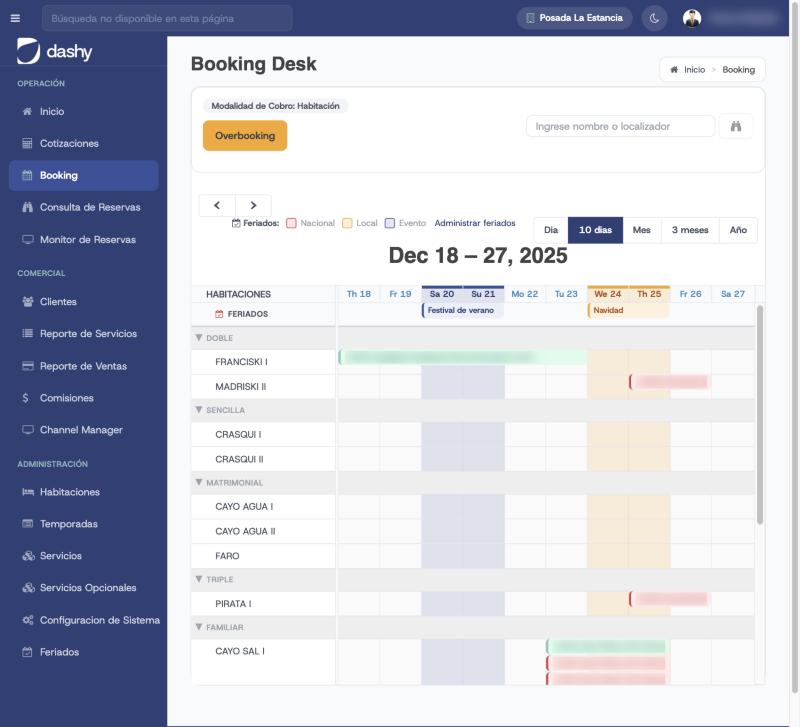
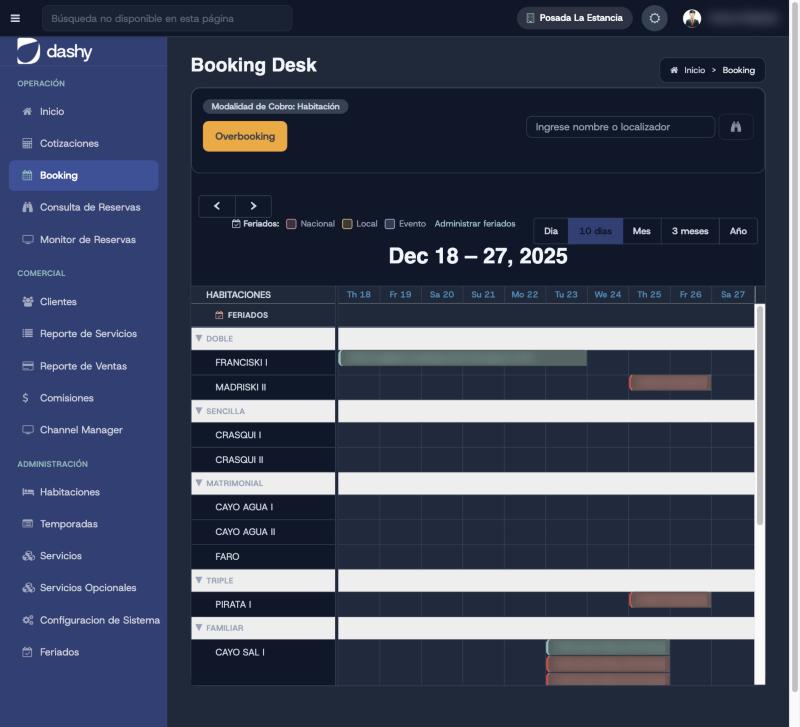
Your occupancy day by day, with holidays marked
The Booking Desk shows every room on a calendar by day, 10 days, month, 3 months or year, colored by status: pending, partly paid, confirmed or expired. Click a free day and choose: quote, book or block.
- Drag to book, and move or stretch reservations on the same calendar
- National and local holidays and your own events shown on each day
- Charge per person or per room, however you work
- Overbooking monitor with email alerts
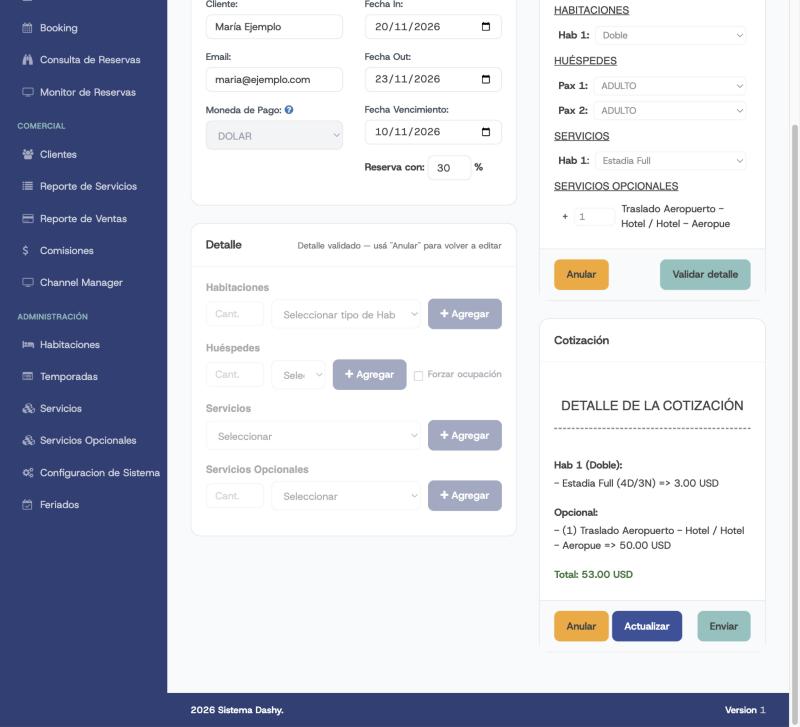
Quote in seconds, convert in one click
Enter dates, rooms, guests by type, services and extras, and the price is calculated with your seasonal rates. The quote comes out as a PDF, goes by email with your template and expires on the date you choose.
- Rates by season, room type and guest type
- Extras such as transfers, late check-out or surcharges
- Deposit percentage and payment deadline
- An accepted quote becomes a reservation without retyping anything
What your operation needs, without side spreadsheets
Multi-currency payments
Every payment with its method, reference and receipt; the reservation confirms itself once fully paid, using the day's exchange rate.
Clear commissions
Agencies, sellers and employees, by percentage or fixed amount, with a PDF or Excel report.
Business reports
Sales by period, currency, user and status; guest lists and the services to prepare each day.
Guests and agencies
Your guest and agency database, with a search that doesn't trip over accents or formats.
Automatic emails
New reservation, confirmed reservation, payment received, expired reservation and expired quote, with your templates.
AFIP e-invoicing
For hotels in Argentina: electronic invoices with your company's tax details.
Roles and permissions
Administrator, executive, data entry, viewer, housekeeper and Operator: everyone sees only what they need.
Reservation monitor
Every new booking, change, cancellation and payment is logged with who did it.
Manual and video tutorials
Help on every screen, a full manual and videos per module to train your team.
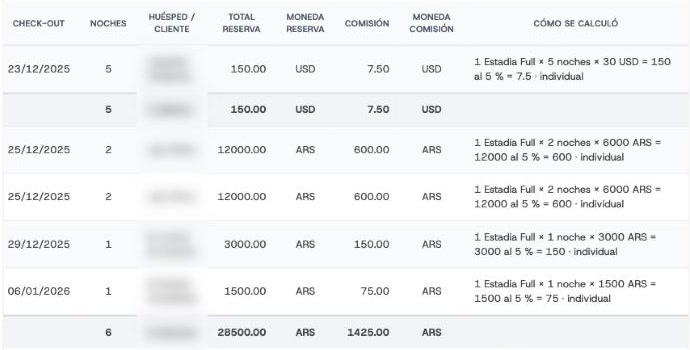
Every commission shows how it was calculated
Set up beneficiaries (agencies for their bookings, sellers for what they enter and employees with their start and end dates) and the formula: percentage or fixed amount, by room type or guest type, with commissionable extras. Dashy generates the commissions for confirmed reservations and builds a statement ready to send.
- Report per beneficiary on screen, in Excel and as a PDF with your logo
- A “How it was calculated” column on every line
- Each commission in its reservation's currency
Your team checks guests in without seeing what the hotel earns
The Operator is a read-only front desk user: they see the Booking Desk, reservations and guests without any amounts, and check guests in and out from the app. If a reservation has a balance due, they are told to send the guest to the office, without seeing the amount.
- No rates, totals, payments or sales reports
- Sees the payment status to know whether check-in can go ahead
- Amounts are removed on the server, not just hidden on screen
What the Operator sees
- Booking Desk and reservations, without amounts
- Payment status: pending, partly paid or confirmed
- Check-in and check-out from the app
- Guests, rooms and holidays, read-only
PMS frequently asked questions
Do I need to install anything?
No. Dashy runs in the browser, on the front desk computer or any other, and your team also gets the mobile app.
Does it work with dollars, pesos and bolívares?
Yes. You set the currencies you work with and the day's exchange rate; quotes, payments and reports keep each reservation's currency.
Who sets up the system?
We do it with you during onboarding: rooms, seasons, rates, services and users. Then your team runs it on its own, with the manual and the video tutorials.
Is it a good fit for a small inn?
Yes. Dashy is used by inns with a handful of rooms and by larger hotels, and pricing is per hotel.
Explore the rest of Dashy
Each module works on its own and does more connected to the rest.
- Booking engine
Your website sells on its own, commission-free
Learn more - Channel Manager
Booking, Expedia and more, always in sync
Learn more - Staff app
Your hotel in your team's pocket
Learn more - WhatsApp agent
A receptionist that books and collects on WhatsApp
Learn more - Voice agent
Answers the phone when you can't
Learn more - Payments
Get paid online and stop chasing payments
Learn more - Marketplace
More channels to sell your nights
Learn more - AI visibility
Your hotel, visible in ChatGPT, Gemini and Claude
Learn more
Put your hotel in order.
Book a 30-minute demo and we'll show you Dashy with a hotel like yours.